

OrbitalVoyage: A Fake TikTok App Drops an Android RAT Behind a VPN Black Hole
A Fake TikTok App That Turns Off the Internet
Recently, we observed a TikTok-themed Android sample, TkTok_Candy.apk, in public Triage submissions. Instead of shipping its RAT directly, it uses a dropper that asks the victim to allow a VPN connection “because of the law”, quietly cuts the whole phone off from the internet, and installs the real payload while Google Play Protect cannot reach the cloud. Once the installation finishes, the VPN disappears and the payload, an Android RAT that we dubbed OrbitalVoyage RAT (named after its package name, com.digitalpearl.orbitalvoyage), starts talking to its C2.
In this blog post, we walk through the infection chain, explain the evasion tricks, and share what we found.
Key Takeaways
- The chain has four stages, including two APKs, from a packed TikTok look-alike to the OrbitalVoyage RAT, and both APK containers reuse anti-analysis tricks we covered in our Octo2 research.
- While the RAT is being installed, the dropper’s VPN black-holes every app’s connections, so Google Play Protect most likely cannot get a cloud verdict.
- The RAT is installed through Android’s session-based
PackageInstaller, so Restricted Settings on Android 14 do not block its accessibility service. - OrbitalVoyage RAT needs almost no sensitive permissions: one accessibility grant gives the operator remote control, overlay phishing, notification theft, and anti-removal.
Technical Analysis
Targeted Sample Information
- SHA256:
114b24cbaabdc7c31109a9cbb86e2ddfa440e0f579f27c7d4b5406823c69bbbd - Filename:
TkTok_Candy.apk(com.horizoncrane.emeraldlilac) - Sample: 260906-vnas7aydma
Both APKs in the chain require Android 14 or later (minSdkVersion 34).
Stage 1: TkTok_Candy Loader
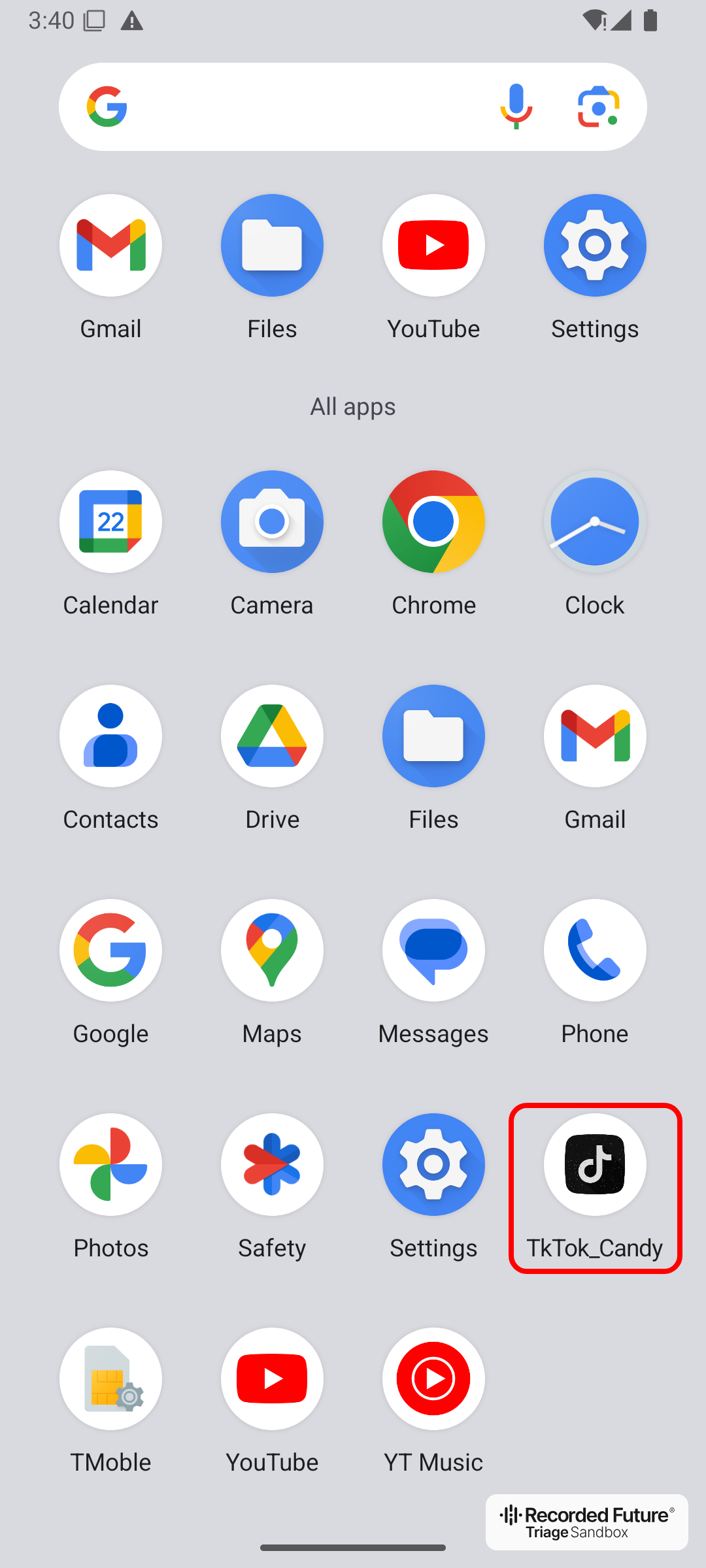
The TkTok_Candy icon on the home screen
TkTok_Candy borrows TikTok’s name, minus one letter, and its music-note icon. Its Application class, org.auction.inject.Gjunglemelody, is only a packer stub. It RC4-decrypts the asset TThhk.html (key Rnto), hidden under 84 nested directories with random names, and loads the real dropper from it.
The container is built to break analysis tools while staying installable on Android:
- Decoy DEX files and broken extra fields: hundreds of zero-filled
classes000.dex-style entries, plus malformed extra-field data in about half of the ZIP entries, the same tricks we covered in our Octo2 research. Android tolerates both, but many static analysis tools fail on them. - Stored manifest with a fake size:
AndroidManifest.xmlis stored uncompressed, but its declared compressed size is much smaller than its real size, and its CRC is wrong. Android reads stored entries by their uncompressed size and does not check CRCs, so the APK installs as usual.
After the victim opens TkTok_Candy and accepts the VPN prompts, the dropper black-holes all IPv4 and IPv6 traffic through the VPN before it installs the second APK.
Stage 2: VPN Black-Hole Dropper
- SHA256:
12d984ffea337d8ecb56aa0ef8f8f00a37737523f6c1ee77444e409b85c75d5f(decrypted dropper DEX)
The dropper, running inside TkTok_Candy, is a small WebView-based app. It loads a local lure page with an adult site in the background and shows two fake dialogs in the device’s language, one of 30, with English as the fallback.
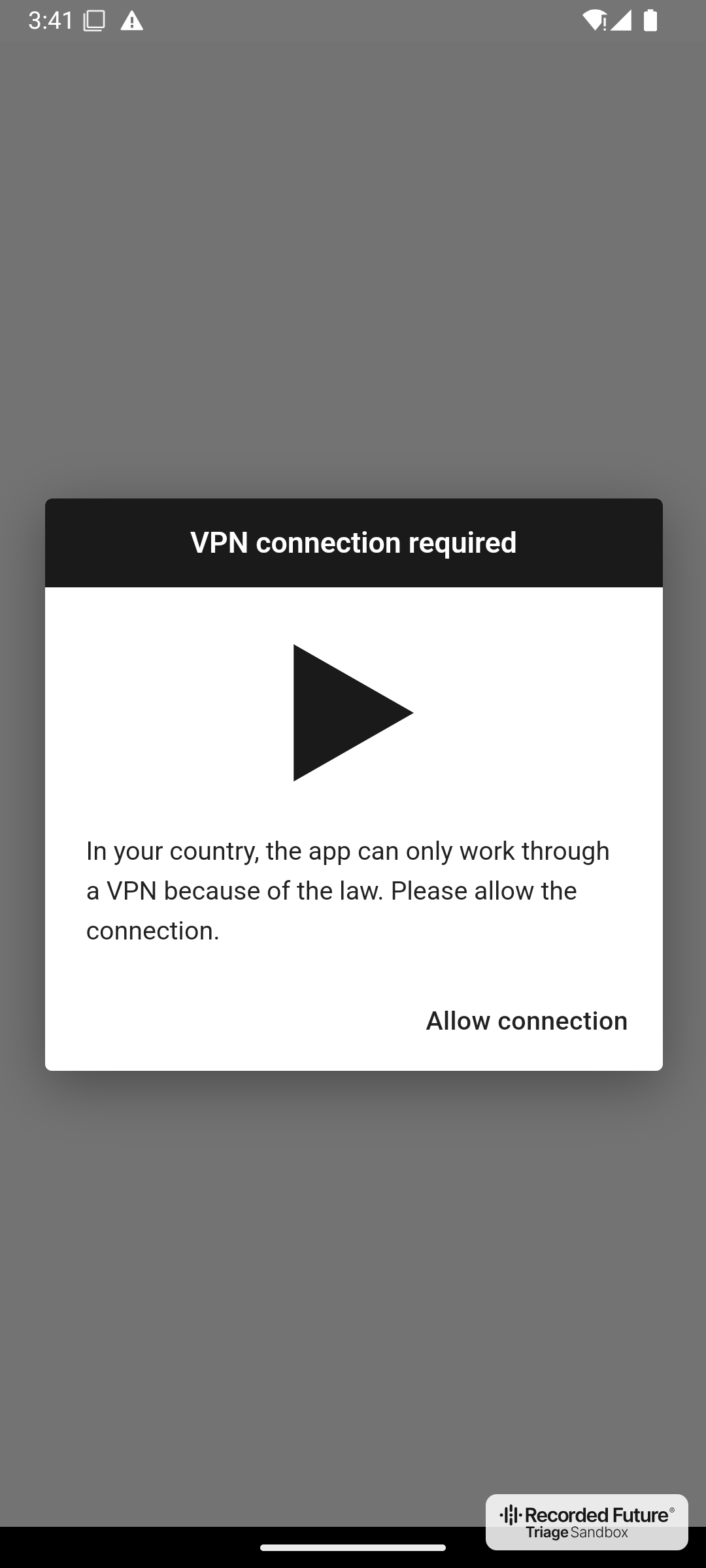
The fake VPN dialog
The first dialog says that “in your country, the app can only work through a VPN because of the law”. “Allow connection” opens Android’s own VPN consent dialog.
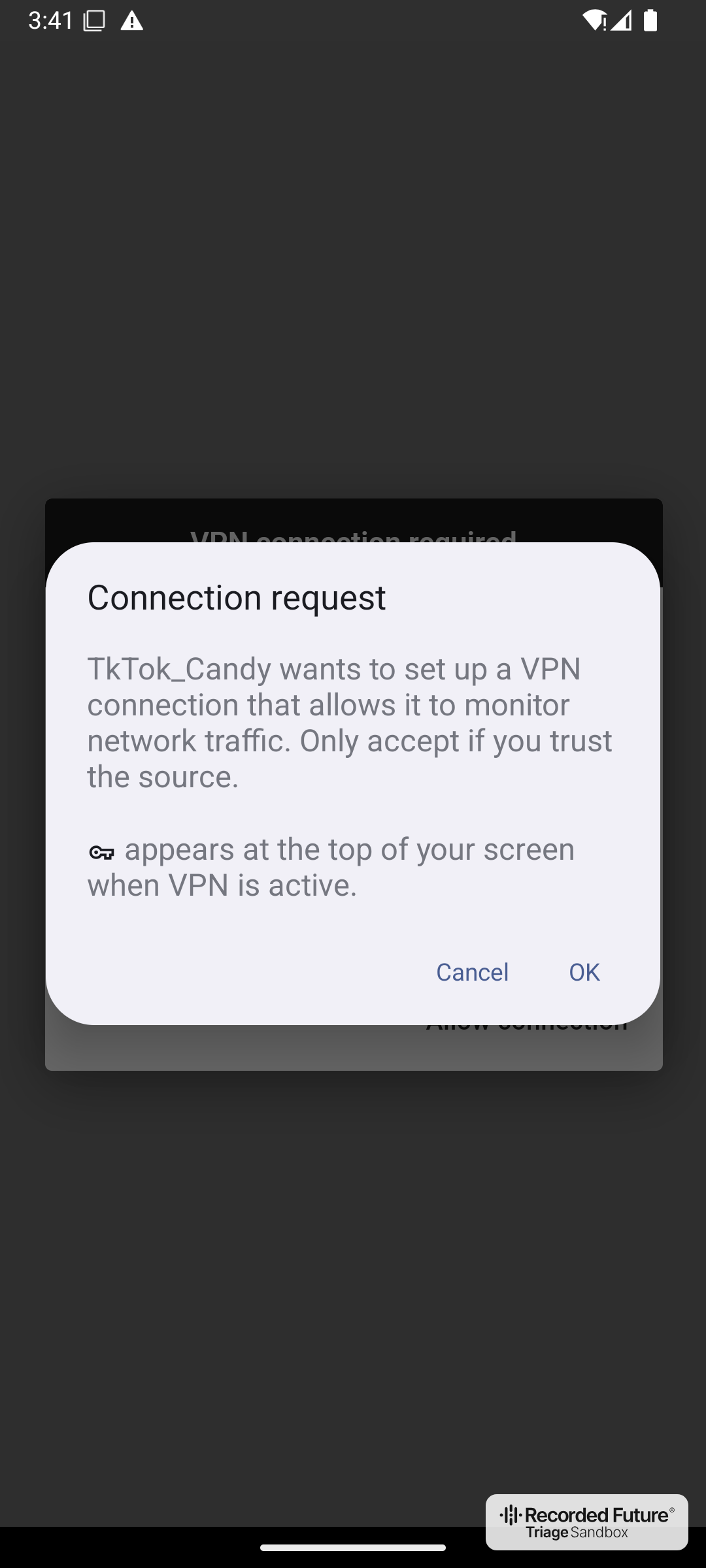
The system VPN consent dialog
Once the victim taps OK, the dropper starts a VPN session named “Internet blocked”. It routes every app’s IPv4 and IPv6 connections into the dropper and throws the packets away, so no app, including Play Store, Play services, and the dropper itself, can connect anywhere. The most likely purpose is to keep Google Play Protect from getting a cloud verdict on the payload.
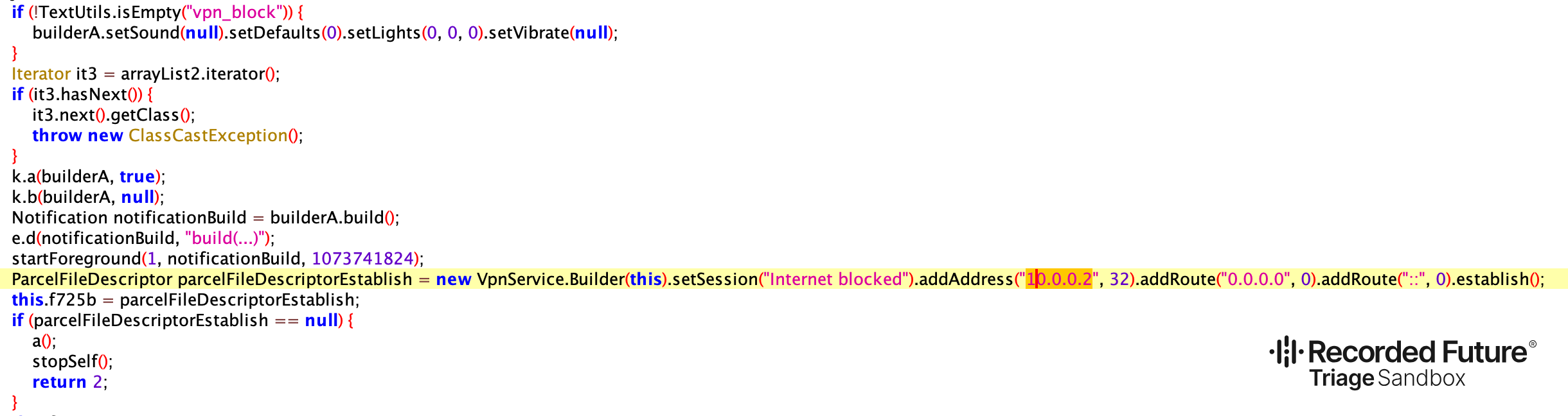
The dropper’s VPN setup that routes all IPv4 and IPv6 traffic into the VPN
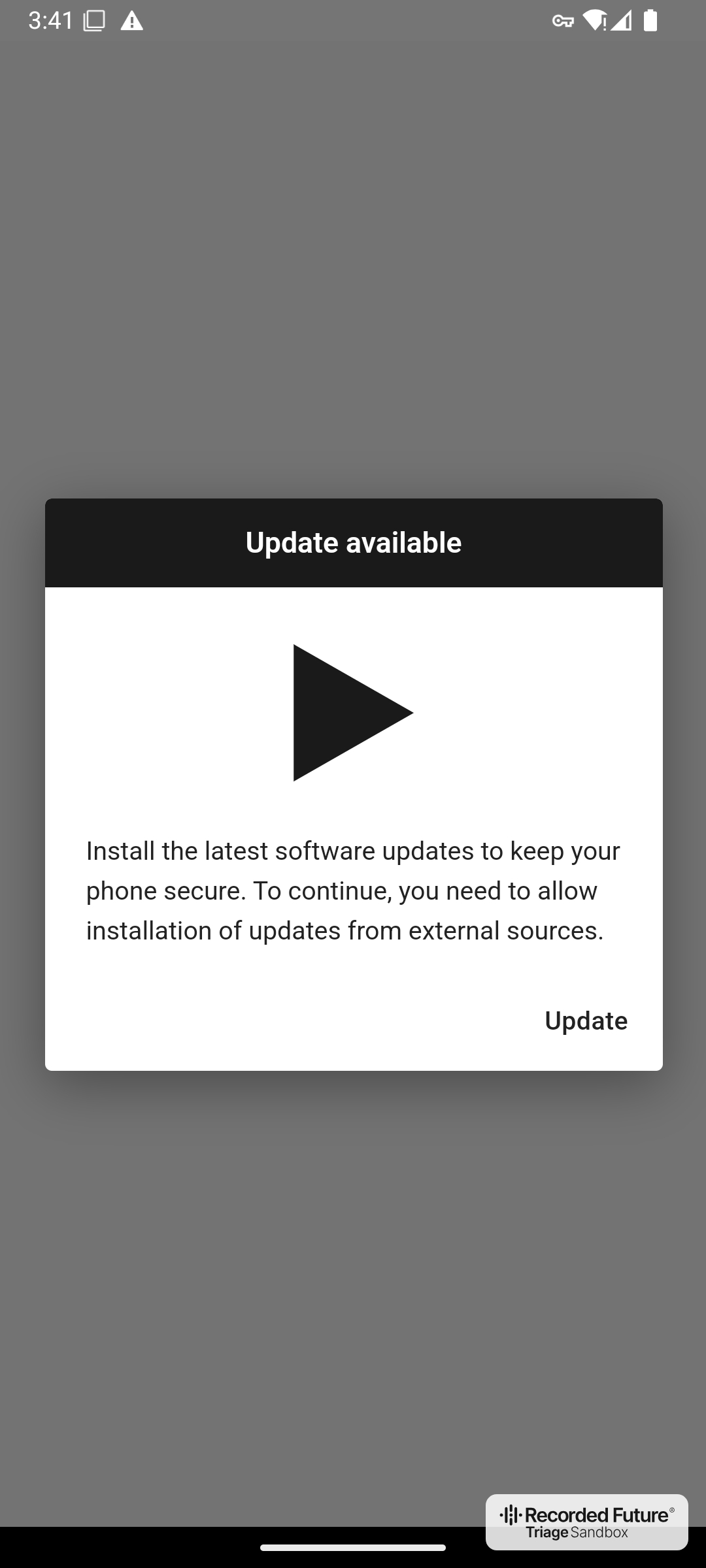
The fake system update dialog
The second dialog announces an update. Tapping “Update” starts the payload install, and Android first asks the victim to allow installs from TkTok_Candy.
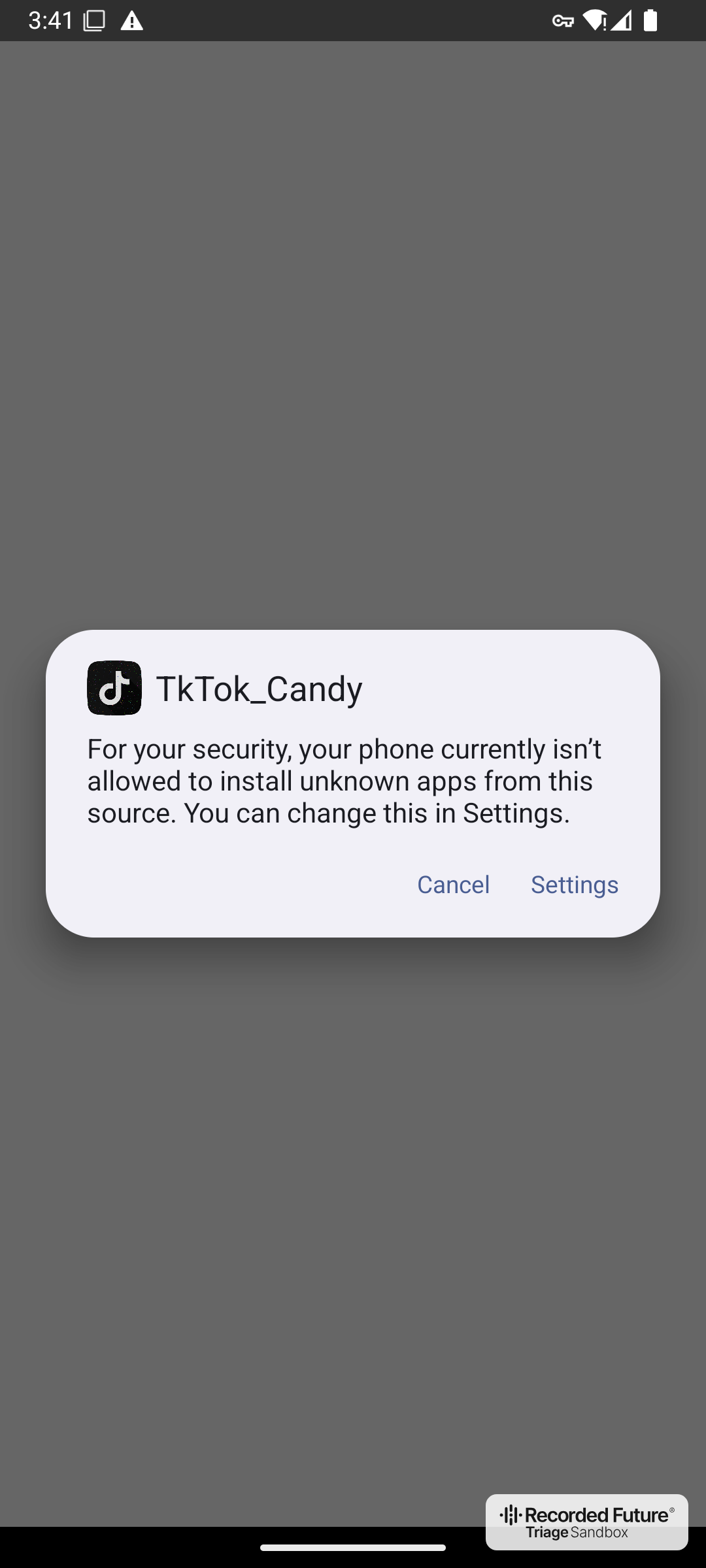
Android blocking the unknown source
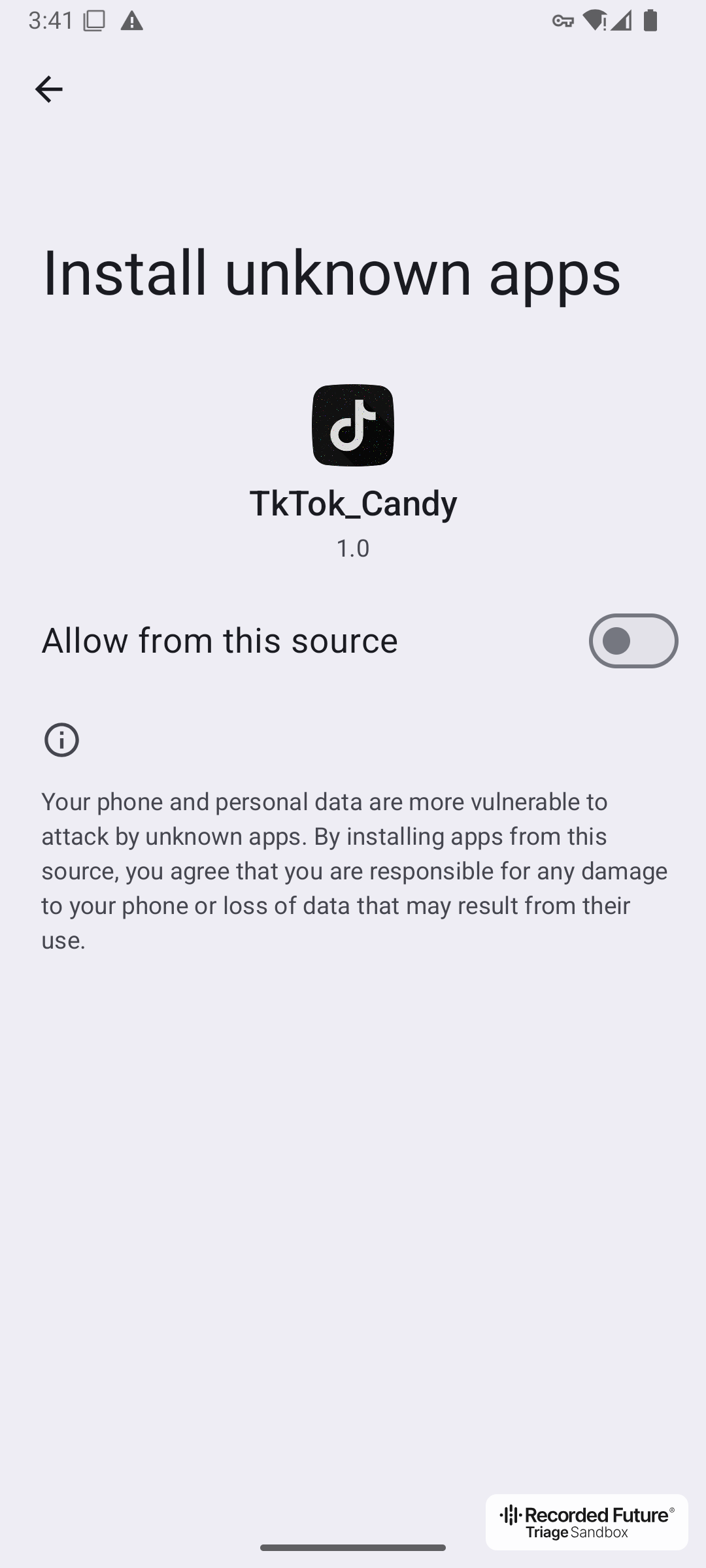
The Install unknown apps settings page
The install does not pass an APK file to Android’s installer app. Instead, the dropper streams the payload into a PackageInstaller session it creates itself. On Android 14, Restricted settings, which by default block Accessibility and notification-listener access for sideloaded apps, apply only when the session is marked as a local or downloaded file, which the system installer does when it opens an APK file. The dropper leaves the source unspecified, so nothing stops the victim from enabling the RAT’s accessibility service.
As soon as the install succeeds, the dropper stops the VPN and launches the payload, while a failed install leaves the device offline.
The dropper also reports three events, open, update_click, and install_success, together with a random six-character device ID, to hxxps://cloudstatesinfo[.]space/event. The dropper only sends data there; it reads the response and discards it.
Stage 3: GoogleUpdateService Loader
- SHA256:
bc2ceabf28a2c601999649e2516005bd2bac301d66c467311d0f958c0e1f66fe(embedded APK,com.digitalpearl.orbitalvoyage)
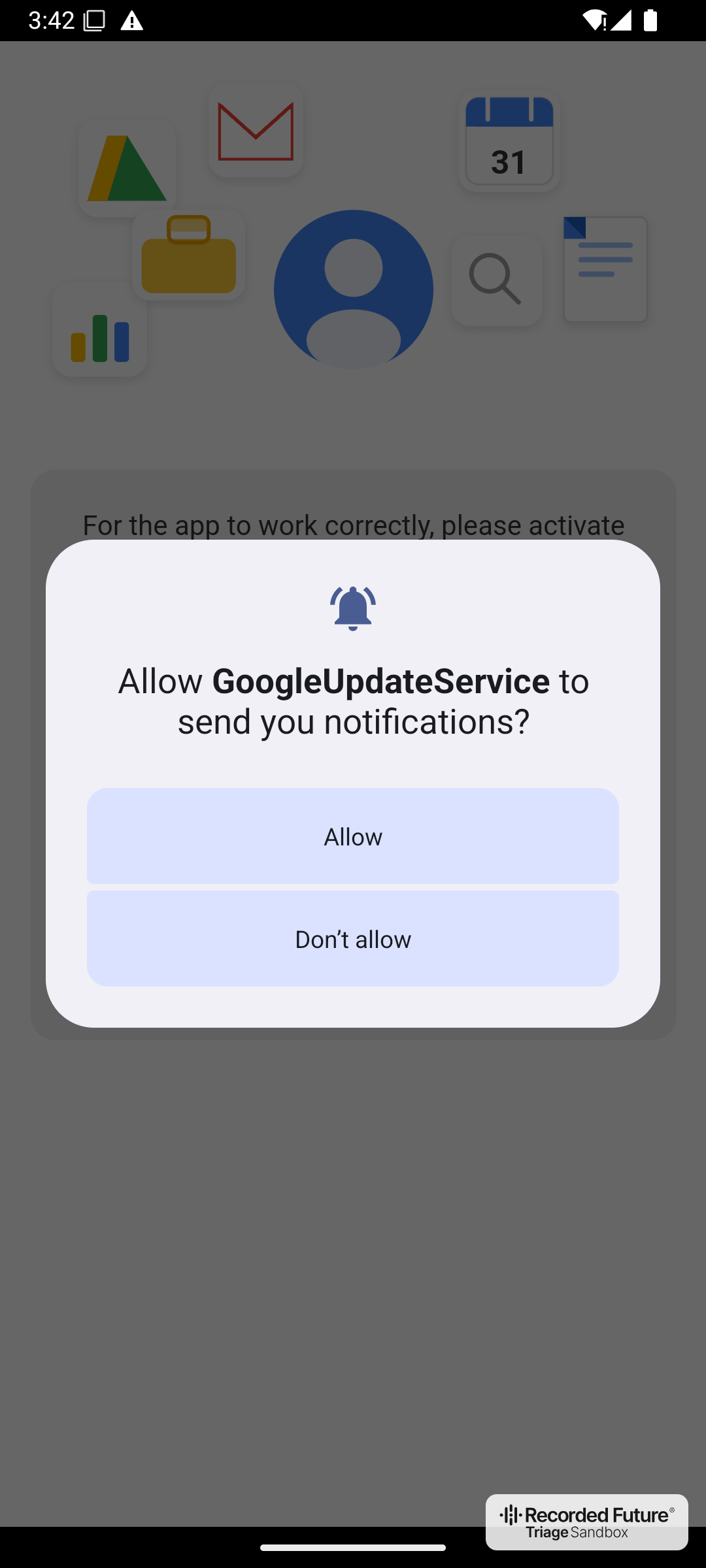
The payload asking for notification permission
The payload calls itself “GoogleUpdateService”, uses the Google Play services icon, and has no launcher icon. Its container uses the same tricks as Stage 1, and its Application class RC4-decrypts the asset rnG.jpg (key MI) and injects the RAT code into the app’s class loader.
On first launch, it asks for notification permission and opens a Google-styled page that walks the victim through enabling “Update Service” in Accessibility. Settings actually lists the service as “GoogleUpdateService”, and the last system prompt asks to give it full control of the device.
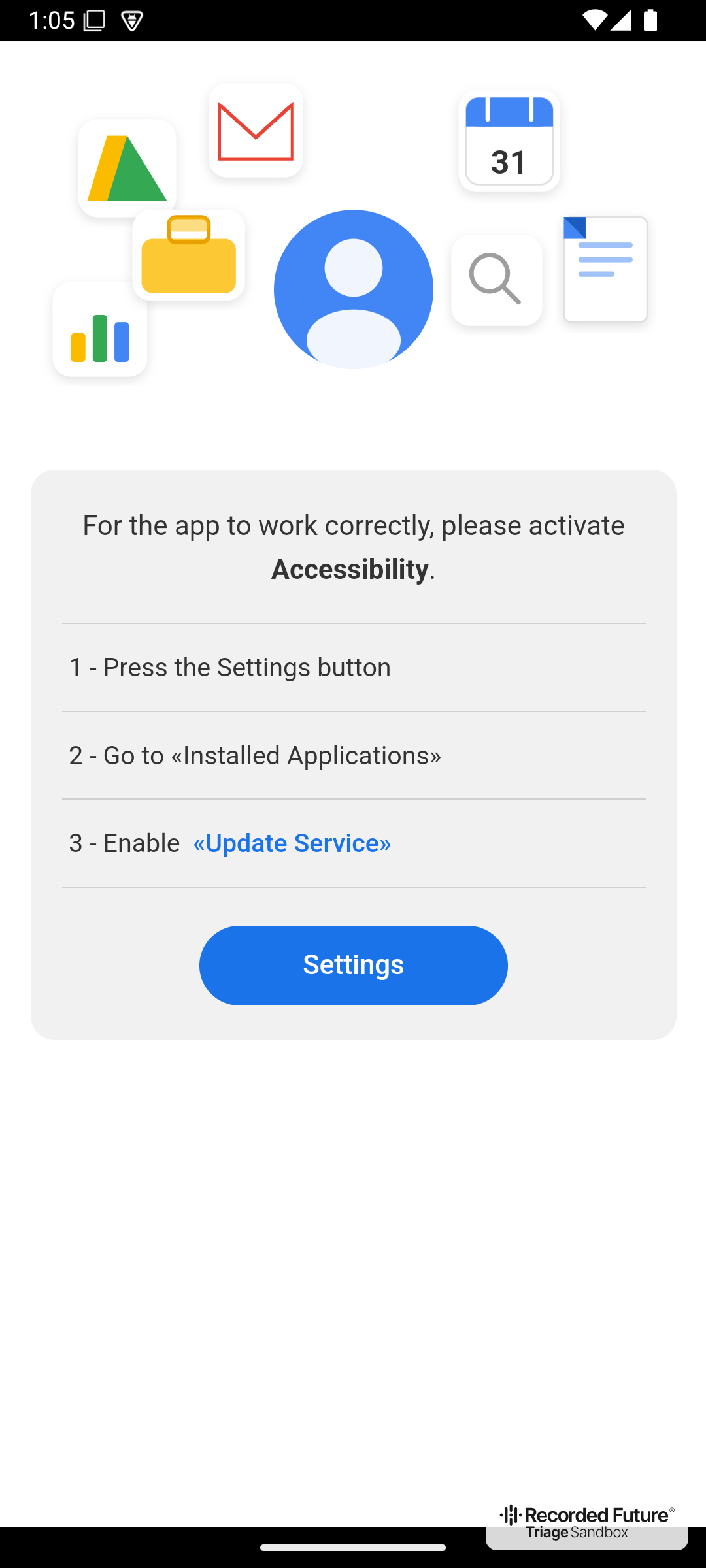
The accessibility lure page
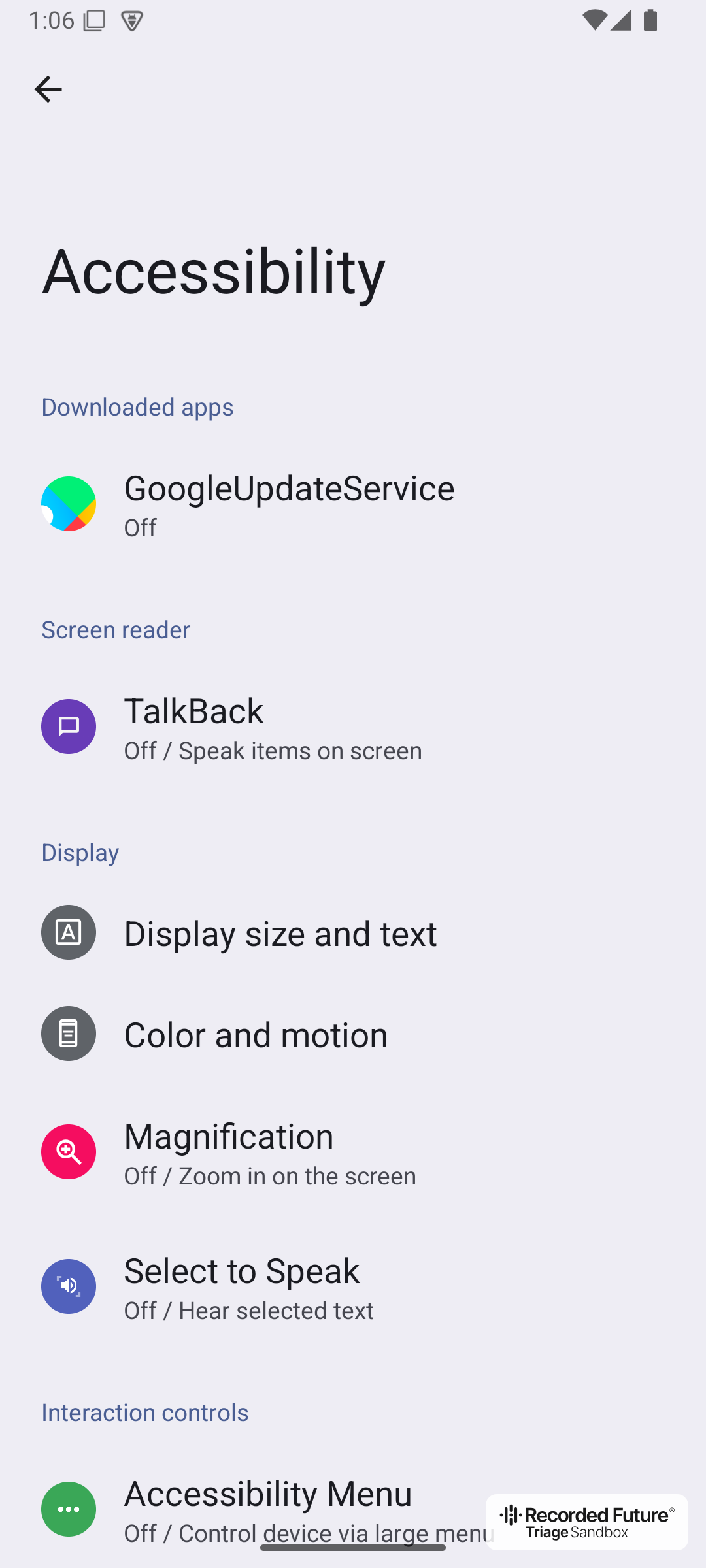
The accessibility settings page
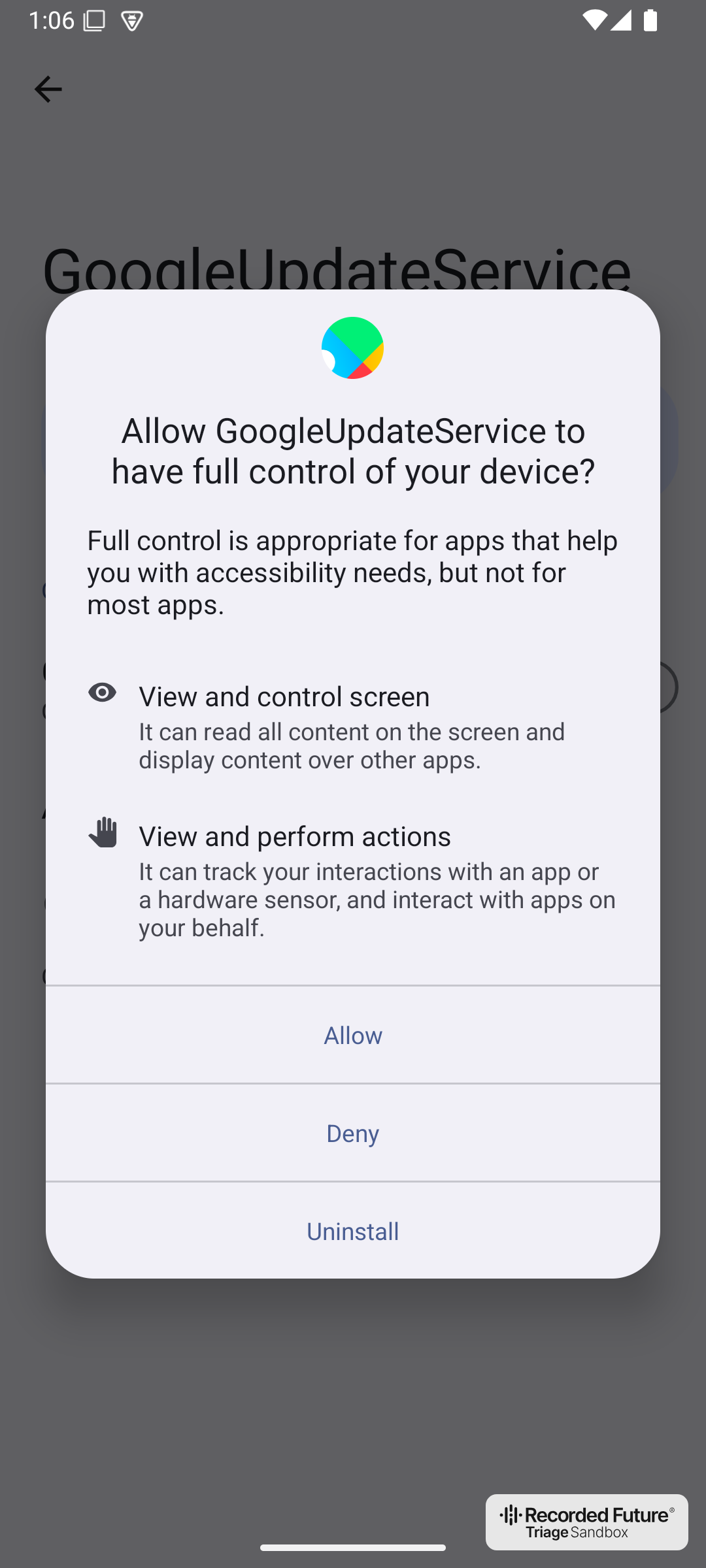
The full control dialog
Stage 4: OrbitalVoyage RAT
- SHA256:
983abb1b88850ab8008e21c1cf4f0fb694b9988c4a57f87f7d37bfd905ac9e3e(classes.dex) - C2:
hxxps://cloudmadrid-nginxservergate[.]com/api
OrbitalVoyage is an Android RAT that uses remote control and overlay phishing as its core capabilities. It requests no SMS, contacts, phone, or notification-listener permission. Almost everything comes from its accessibility service, which listens to every event in every app.
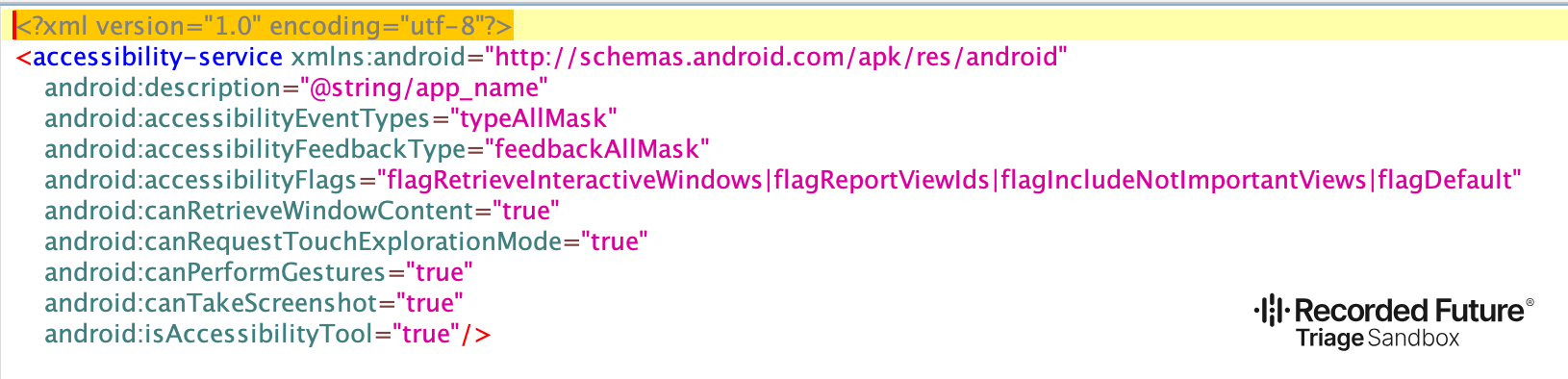
The RAT’s accessibility service listens to all events and declares itself an accessibility tool
The following are its main capabilities:
- Remote control: the operator taps, swipes, types, and draws gestures such as unlock patterns through accessibility, while the on-screen element tree streams over a WebSocket. Once the victim allows screen capture, screenshots stream too.
- Cover screen: a full-screen “Installing system update” page hides what the operator is doing on the victim’s own device.
- Overlay phishing: when an app on the C2’s target list comes to the foreground, the RAT shows a phishing page served by the C2 and sends back whatever the victim types. Once the upload goes through, the RAT removes that app from the list.
- Notification theft: the title and text of new notifications from any app are uploaded, so one-time passwords can leak without any SMS permission.
- Defense evasion: the operator can block the default SMS app and open Play Protect’s settings, and the RAT backs out of settings whenever the victim tries to disable or uninstall it.
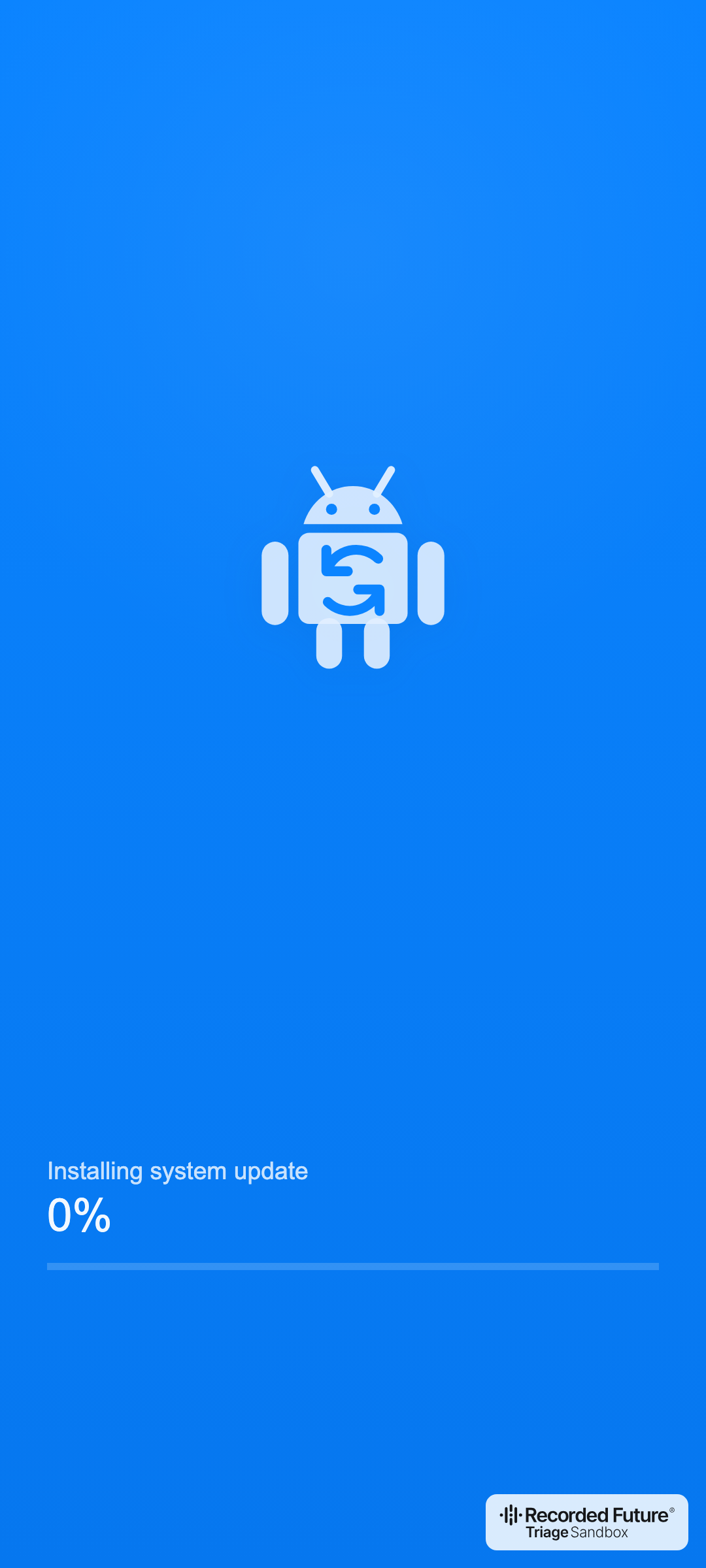
The cover screen, rendered from the RAT’s duffy_gregor.html asset
By default, the RAT sends every request as an HTTPS POST to one hardcoded endpoint, and the C2 can push replacement gates, which the RAT reads only when it starts. Every request carries a command name and a five-character bot ID. Except for setKey, the body is XORed with a random 16-byte per-device key and Base64-encoded; setKey sends that key in clear, inside TLS. The C2’s replies are plain JSON.
- Bot to C2:
setKey,botAddInfo(device details and app list),ping(heartbeat with the bot’s warning and error log),setPermissions,interceptPush(stolen notifications), andinjectData(phished input). - C2 to bot:
inject(add apps to the phishing target list),forceInject(show a phishing overlay now),show_overlay(cover screen),show_push(fake notification),open_url,sound_off,avnc(start remote control), andgetGates(new C2 addresses). - Remote-control WebSocket: 21 commands covering taps, swipes, text input, the clipboard, system navigation, app launch, gesture drawing, muting, the cover screen, screen capture and element-tree streaming, SMS blocking, shortcuts to Play Protect’s and the app’s own settings, and ending the session.
The full command reference is in the appendix at the end of this post.
During our analysis of OrbitalVoyage, the C2 answered our requests but never returned a single command, so we could not obtain a target list. This may suggest that the RAT has not been widely distributed yet or that the threat actors behind it are still developing it.
Targets
We only have access to the samples submitted to Triage, so we cannot determine how TkTok_Candy is distributed or who has installed it. However, the sample provides some clues. TkTok_Candy is designed to mimic TikTok and uses adult content as a lure, showing an adult website behind its fake dialogs. The lure supports 30 languages, and the lure page’s HTML source contains Russian code comments that mention 50 countries where these languages are spoken. Most of these countries are located in Africa, South and Southeast Asia, the Middle East, and Latin America. The Russian comments may point to a Russian-speaking developer, but language artifacts like these are not enough on their own to attribute the campaign.
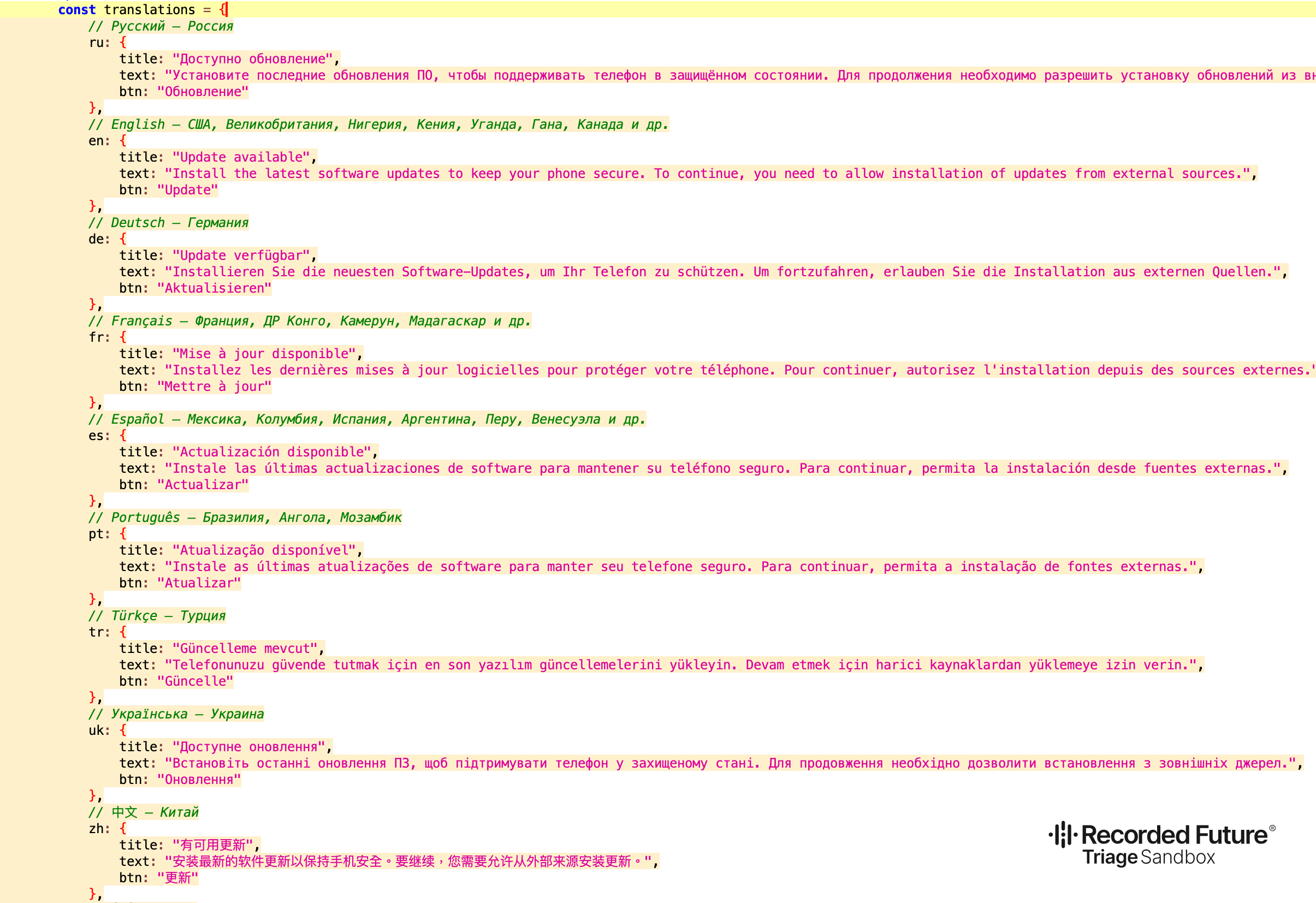
Russian code comments in the lure page’s translation table
The table below lists each lure language and the countries named in its comment, translated from Russian:
| Language | Countries listed in the comment |
|---|---|
Russian (ru) |
Russia |
English (en) |
United States, United Kingdom, Nigeria, Kenya, Uganda, Ghana, Canada, and others |
German (de) |
Germany |
French (fr) |
France, DR Congo, Cameroon, Madagascar, and others |
Spanish (es) |
Mexico, Colombia, Spain, Argentina, Peru, Venezuela, and others |
Portuguese (pt) |
Brazil, Angola, Mozambique |
Turkish (tr) |
Turkey |
Ukrainian (uk) |
Ukraine |
Chinese (zh) |
China |
Hindi (hi) |
India |
Indonesian (id) |
Indonesia |
Urdu (ur) |
Pakistan |
Bengali (bn) |
Bangladesh |
Japanese (ja) |
Japan |
Filipino (fil, tl) |
Philippines |
Arabic (ar) |
Egypt, Algeria, Sudan, Iraq, Morocco, Saudi Arabia, Yemen, and others |
Vietnamese (vi) |
Vietnam |
Persian (fa) |
Iran |
Thai (th) |
Thailand |
Swahili (sw) |
Tanzania, Kenya, Uganda |
Korean (ko) |
South Korea |
Polish (pl) |
Poland |
Malay (ms) |
Malaysia |
Nepali (ne) |
Nepal |
Uzbek (uz) |
Uzbekistan |
Amharic (am) |
Ethiopia |
Burmese (my) |
Myanmar |
Zulu (zu) |
South Africa |
Afrikaans (af) |
South Africa |
Malagasy (mg) |
Madagascar |
Detection
Defenders can look for the following signals:
- A malformed
AndroidManifest.xmlwhose declared compressed size differs from its uncompressed size. Read such entries the way Android does and flag them instead of rejecting the APK. In Triage,Attempts to obfuscate APK file formatin the static signature clearly indicates this issue. - A newly installed app that requests VPN access for no reason related to its function and then immediately installs another package is a red flag.
- An app without a launcher icon that poses as a Google component and declares an accessibility service that listens to all events and claims to be an accessibility tool, which spares it Android’s reminder that the app can view and control the screen.
MITRE ATT&CK Techniques
| ID | Technique |
|---|---|
| T1406.002 | Obfuscated Files or Information: Software Packing |
| T1655.001 | Masquerading: Match Legitimate Name or Location |
| T1628.001 | Hide Artifacts: Suppress Application Icon |
| T1629.001 | Impair Defenses: Prevent Application Removal |
| T1629.003 | Impair Defenses: Disable or Modify Tools |
| T1541 | Foreground Persistence |
| T1453 | Abuse Accessibility Features |
| T1516 | Input Injection |
| T1417.002 | Input Capture: GUI Input Capture |
| T1517 | Access Notifications |
| T1513 | Screen Capture |
| T1418 | Software Discovery |
| T1426 | System Information Discovery |
| T1437.001 | Application Layer Protocol: Web Protocols |
| T1521.001 | Encrypted Channel: Symmetric Cryptography |
| T1646 | Exfiltration Over C2 Channel |
Conclusion
This chain shows how much an Android dropper can do with very little. We see more and more Android malware reach victims this way, through a separate dropper that gets them past the device’s defenses. A TikTok look-alike, two fake dialogs, and a short-lived VPN are likely enough to get a fresh RAT past Play Protect’s install-time cloud check, and a few malformed ZIP structures are enough to make analysis tools fail.
For users, the two system prompts in this chain matter most: the VPN connection request and the accessibility “full control” prompt. Be very careful with both, since few legitimate apps need either.
We will keep tracking this malware as new builds show up in public Triage. Stay tuned and follow our blog posts to get the most out of our sandbox. If you haven’t signed up yet, visit tria.ge to register for a free account!
Indicators of Compromise (IOCs)
Stage 1: TkTok_Candy Loader
| SHA256 | Artifact |
|---|---|
114b24cbaabdc7c31109a9cbb86e2ddfa440e0f579f27c7d4b5406823c69bbbd |
TkTok_Candy.apk, 260906-vnas7aydma |
9840f04b56247571ec504b5fc2a29134d491b339607de076e79a1e86b2d15db4 |
TThhk.html, RC4-encrypted dropper |
Stage 2: VPN Black-Hole Dropper
| SHA256 | Artifact |
|---|---|
12d984ffea337d8ecb56aa0ef8f8f00a37737523f6c1ee77444e409b85c75d5f |
Decrypted dropper DEX |
Stage 3: GoogleUpdateService Loader
| SHA256 | Artifact |
|---|---|
bc2ceabf28a2c601999649e2516005bd2bac301d66c467311d0f958c0e1f66fe |
GoogleUpdateService APK |
6f70d27286c69da3bc1873adaf8f232d30225f1488a6a0598ca2c2e1b70fbb2a |
rnG.jpg, RC4-encrypted RAT |
Stage 4: OrbitalVoyage RAT
| SHA256 | Artifact |
|---|---|
983abb1b88850ab8008e21c1cf4f0fb694b9988c4a57f87f7d37bfd905ac9e3e |
Decrypted classes.dex |
Network
| Indicator | Type |
|---|---|
hxxps://cloudmadrid-nginxservergate[.]com/api |
OrbitalVoyage C2 |
hxxps://cloudmadrid-nginxservergate[.]com/api/injects/ |
Overlay phishing pages |
37.143.130[.]206 |
C2 host |
hxxps://cloudstatesinfo[.]space/event |
Dropper telemetry |
Appendix: OrbitalVoyage C2 Commands
Bot to C2
| Command | Payload | Description |
|---|---|---|
setKey |
key: 16 random bytes, Base64 |
Registers the per-device XOR key |
botAddInfo |
botTag (hohl3), deviceName, androidVersion, language, appPackages |
Registers the device and its launcher apps |
ping |
batteryLevel, charging, screen, logList (warnings and errors) |
Heartbeat; as the only periodic request, it is the bot’s main way to receive commands |
setPermissions |
permissions: ["accessibility"] |
Reports that accessibility is granted |
interceptPush |
appName, package, title, body |
Steals notification content |
injectData |
package, data (form JSON) |
Sends phished input; once the upload goes through, the app leaves the target list |
Because ping starts only after accessibility is enabled, the C2 can send commands before that point only in its replies to setKey and botAddInfo.
C2 to Bot
| Command | Data | Description |
|---|---|---|
inject |
List of package names | Adds apps to the persistent phishing target list. When one of them comes to the foreground, the RAT opens <gate>/api/injects/<package> in a WebView. |
forceInject |
Package name | Immediately shows <gate>/api/injects/<package> in a full-screen accessibility overlay. |
show_overlay |
value (1 shows, anything else hides); type is ignored |
Shows or hides the “Installing system update” cover screen. The state is saved, so a visible cover screen comes back after the accessibility service restarts. |
show_push |
title, body, package; icon, icon_body, url, and webview are parsed but unused |
Posts a fake notification that opens the given app, or the RAT if that app cannot be launched. |
open_url |
url, webview; hidden and count have no effect |
Opens the URL in an in-app WebView with the send_log_injects bridge (webview = 1), or otherwise hands it to the system with ACTION_VIEW. |
sound_off |
None | Sets the media volume to zero. |
avnc |
address |
Opens the remote-control WebSocket at address. |
getGates |
List of URLs | Saves replacement C2 gates; the RAT reads them only when it starts. |
Remote-Control Commands
The operator sends these commands over the WebSocket opened by avnc, using the fields start_x, start_y, stop_x, stop_y, to, text, package, and value. Every command also turns the screen on and keeps it on for up to 60 seconds.
| # | Command | Description |
|---|---|---|
| 1 | click |
Taps at (start_x, start_y) for 100 ms |
| 2 | long_click |
Presses at (start_x, start_y) for 800 ms |
| 3 | swipe |
Swipes from the start to the stop coordinates in 300 ms |
| 4 | swipe2 |
Swipes up, down, left, or right, as given by to, along the middle of the screen from 15% to 85% of its height or width, in 400 ms |
| 5 | text |
Fills the focused input field with text |
| 6 | clipboard |
Writes text to the clipboard |
| 7 | back |
Presses Back |
| 8 | home |
Presses Home |
| 9 | recent |
Opens Recents |
| 10 | open |
Launches the app named in package |
| 11 | drawGraph |
Draws one multi-point gesture from the points in value, such as an unlock pattern |
| 12 | sound_off |
Mutes the media volume |
| 13 | overlay_show |
Shows the cover screen |
| 14 | overlay_hide |
Hides the cover screen |
| 15 | vnc |
Asks the victim for screen capture permission; once granted, screenshots join the stream |
| 16 | stop_vnc |
Stops screen capture |
| 17 | toggle_accessibility |
Turns element-tree streaming on or off |
| 18 | toggle_sms |
Turns blocking of the default SMS app on or off |
| 19 | gpSettings |
Opens Google Play Protect settings |
| 20 | optimize |
Opens the RAT’s own App info page |
| 21 | stop |
Ends the session: closes the socket, stops streaming and screen capture, and hides the cover screen |